

3. Event Board: 11-Col Dispatch, Next Material & Sync
Event Boardis the daily command board forAdmin,Agency Admin(branch-locked), andO2S Admin— launch viaLMS→ Event Board for fullFeedback,Syllabus, andMy recordingsaccess.
1. Quick Filters, Toolbar & 11-Column Reference
- Branches, Search & Windows:
All Agencies, 6 search modes (All,Student,Teacher,Group[single class],Groups,Course), and 10 time windows (Date range,Now,2h ago..Three months ago— picking aGroupauto-narrowed from windows > 1 week resets toThree days ago). - 3 Toolbar Toggle Icons:
- 🗑️
Show Canceled: shows ONLY canceled sessions (click again to exit). - ☑️
Syllabus check (✅/❌): checks from session start time onward — displays✅as soon as marked done (even whileACTIVE), and❌only after end time if unmarked. - ↺
Reset filters: returns cleanly to(All, 4h ago). - Toolbar also holds
Schedule(when filtered to 1 group),Holidays,Export,My recordings(desktop non-Safari only), andLMS / CMS / Base.
- 🗑️
Interactive 11-Column Lookup
Live Ordinal Package Progress on Event Board:
--
Unassigned package
26/48
Standard session
46/48
2 sessions before final
47/48
Penultimate session
48/48
Final session in package
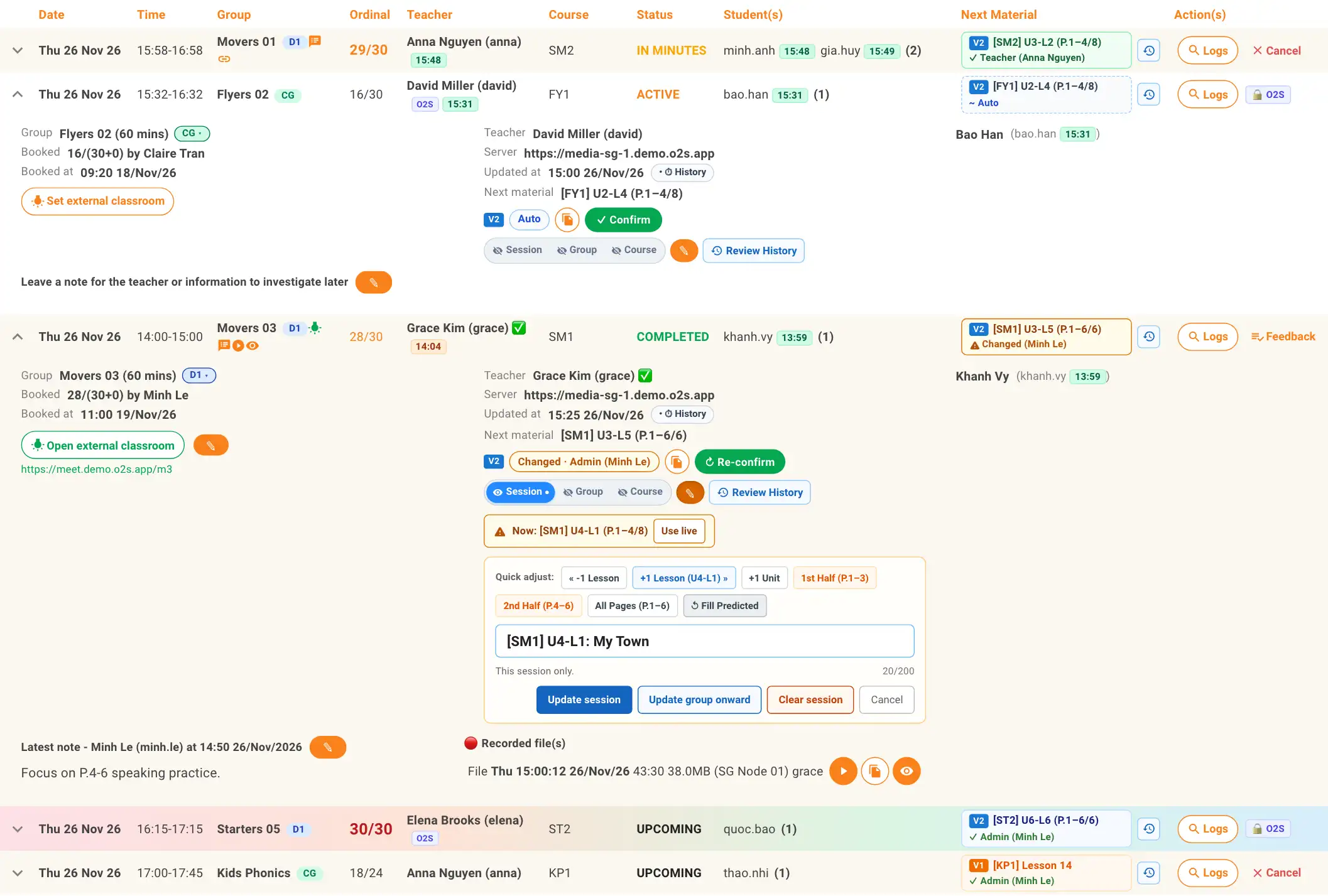
Row Actions & Expanded Panel (▼ Col 1)
[Agency]badge: click in Col 4 to filter; expand▼([Agency ▾]) to reassign branch (auto-syncs to Base).- Substitute Teacher / Server (
✎): expand▼→ click✎besideTeacher/Server(on🔒 O2Ssessions, Teacher/Server changes are handled byO2S Admin); cross-school conflicts flagBusy at another school. - Row Badges: Col 4 displays
Notesbubble,RecordingPlay icon, Eye 👁 (only when visible to Students), Green lightbulb (External Room URL), and Link 🔗 (links insideNotes). Col 7 displays🇨🇳for China Market courses ([CN]in Excel). - Device Warnings &
Connection Logs: detailed alerts (Mic Blocked,System mic muted,Device Busy,High Ping...) live inside expanded Col 1 (▼); clickHH:mm/??to inspectConnection Logs. Recorded Files&• ⏱ History: Play, Copy link, and toggle 👁 Visibility; click• ⏱ Historyfor row change logs.OrdinalHighlights (Col 5): highlights the final 3 sessions (n-2,n-1,n) clearly to prompt timely package renewal.
2. Confirm & Adjust Upcoming Lessons (Next Material)
~ Auto→✓/Changed: upcoming rows preview~ Auto. Once Teacher (on card or insideFeedback) or Manager clicks✓ Confirm, the lesson locks in (V2tracks Teacher vs. Admin confirmation;V1highlights school uploads). Shifts raiseChangedshowingNow: ...withUse liveand↻ Re-confirm.- Inline Edit (
✎inside▼): exposes 7 quick chips (« -1 Lesson,+1 Lesson »,+1 Unit,1st Half,2nd Half,All Pages,↺ Fill Predicted),Session | Group | Coursevisibility selector, andUpdate session,Update group onward(+1, +2...cascade),Clear session,Clear group cursor,Cancel. Gap& Multi-Book (• +[WB]): syncs cleanly to O2S Base Col 11 (Lesson).
Learning History Window (Review History)
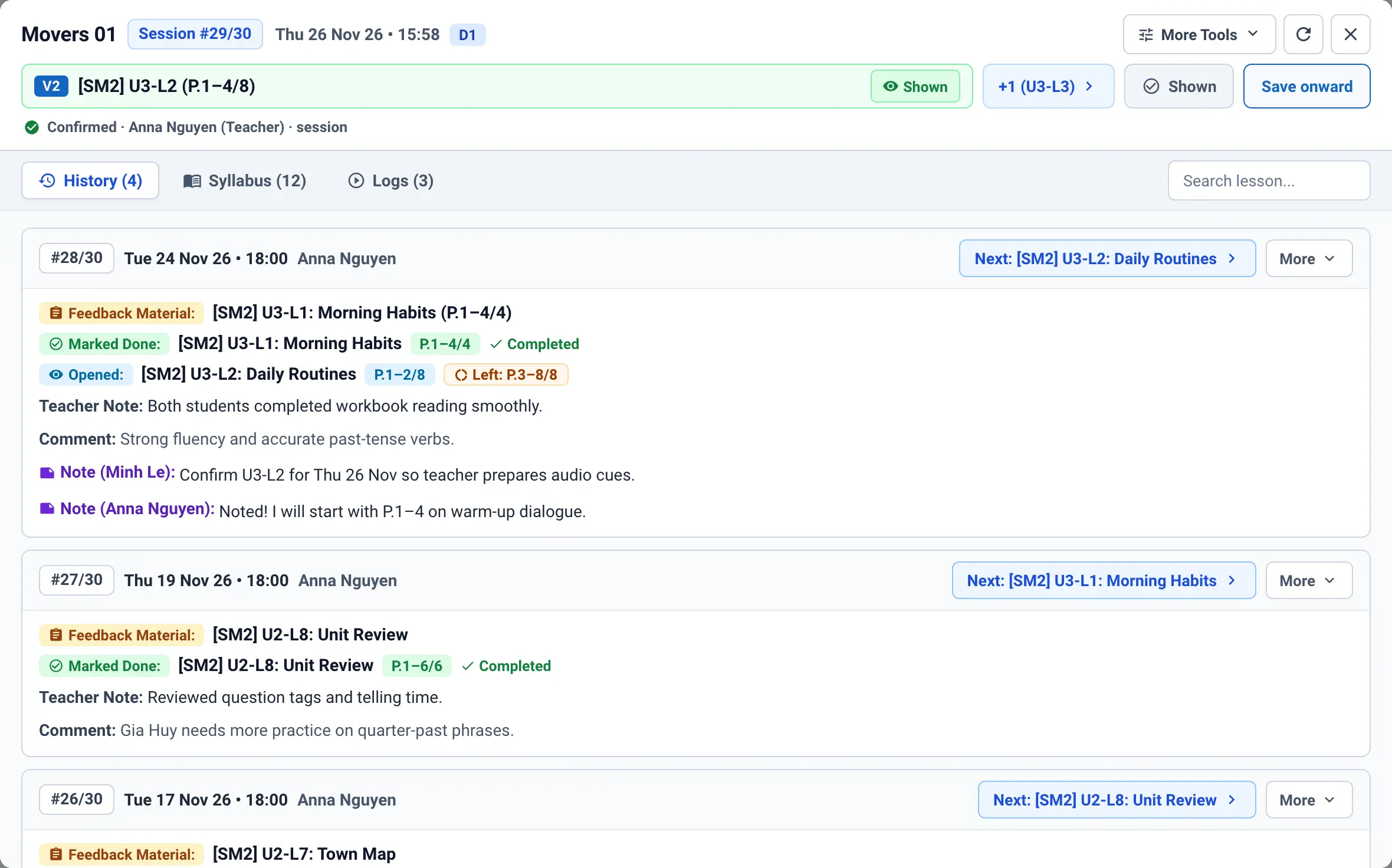
⏱️ 3 Tabs, More Tools ▾ & Threaded Notes (Latest note)
- Admins access all 3 tabs (
History,Syllabus,Logs),More Tools ▾(quick chips +Clear session/Clear group cursor+Shown/Hidden),Show Future (+N),Use lesson >, andSave onward. - Threaded
NotesdisplaysLatest note - ...with← / →navigation and✎inline editing.
3. Auto-Sync Rules & Teacher Tier Permissions
[O2S]Sessions: sync bidirectionally (LMS ↔ O2S Base) for schedules, teachers, attendance,✓ ConfirmNext Material, and feedback; LMS updates to Agencies / Courses / Groups / Users auto-sync to O2S Base.- Internal School
TeacherSessions: remain independent insideLMSwith full✕ Cancelcontrols even inside hybrid groups.
4. Next Up: Smart Scheduling, Cancel/Restore, Holidays & Export
👉 Continue to Chapter 3b — Smart Scheduling, 8-Reason Cancel/Restore, Holidays & Excel Export (#cancel-makeup · #holidays · #smart-scheduling).